Archive for the ‘Commands’ Category

traceroute voracluster01.usatlas.bnl.gov
traceroute to voracluster01.usatlas.bnl.gov (192.12.15.12), 30 hops max, 38 byte packets
1  10.1.1.241 (10.1.1.241)  0.375 ms  0.225 ms  0.206 ms
2  b07-147-200-v624.uchicago.edu (128.135.158.217)  1.421 ms  0.991 ms  0.939 ms
3  10.4.247.73 (10.4.247.73)  1.081 ms  1.026 ms  1.019 ms
4  * mren-iwire-10g-router.uchicago.edu (128.135.247.122)  5.579 ms  2.546 ms
5  chi-gev124-mren.es.net (198.125.140.93)  1.607 ms  1.649 ms  1.621 ms
6  chiccr1-starcr1.es.net (134.55.207.33)  1.870 ms  1.889 ms  2.360 ms
7  clevcr1-ip-chiccr1.es.net (134.55.217.53)  10.919 ms  47.541 ms  11.852 ms
8  washcr1-ip-clevcr1.es.net (134.55.222.58)  18.798 ms  18.514 ms  18.593 ms
9  aofacr2-washcr1.es.net (134.55.218.78)  23.727 ms  23.679 ms  23.752 ms
10  bnlmr1-aoacr1.es.net (134.55.217.57)  26.173 ms  25.634 ms  25.645 ms
11  * bnlsite-bnlmr1.es.net (198.124.216.178)  26.187 ms !X *
12  *

the !X indicates an administrative block
In Mac OS X (and basically anywhere that uses xterms), to put the scrollbar on the RIGHT side of the terminal, instead of the default left side, add the following to ~/.Xresources.

xterm.vt100.RightScrollBar:  true
xterm.vt100.ScrollBar:         true

Must reload autofs for changes to auto.master to take effect.

/etc/rc.d/init.d/autofs reload

We have a vme crate running RedHat Enterprise Linux 3. Students are writing programs to access data on the vme crate. In order to do this, we need a computer with compilation tools and drivers for the vme crate. (The crate only has a 1gb flash card in it, which does not have enough room to hold all the compilation programs.) So, we are using a computer running Cern SL 3.0.8 (2.4.21-27.0.2.EL.cernsmp), which is close enough to the kernel on the crate (2.4.21-4.EL).

The driver/libraries were downloaded from here and the documentation came from here

The software was untarred to /cpv/code/vme where it was compiled with make and installed with make install (as root).

It installed:

ll /usr/lib/libvme.so*
lrwxrwxrwx    1 root     root           11 Aug 18 12:15 /usr/lib/libvme.so -> libvme.so.3
lrwxrwxrwx    1 root     root           13 Aug 18 12:15 /usr/lib/libvme.so.3 -> libvme.so.3.6
-rw-r--r--    1 root     root        12629 Aug 18 12:15 /usr/lib/libvme.so.3.6
/lib/modules/2.4.21-27.0.2.EL.cernsmp/kernel/drivers/vme
ll
total 68
-rw-r--r--    1 root     root        63606 Aug 18 12:14 vme_universe.o
cd /usr/include/vme
ll
total 72
-rw-r--r--    1 root     root        33954 Aug 18 12:15 universe.h
-rw-r--r--    1 root     root        10516 Aug 18 12:15 vme_api.h
-rw-r--r--    1 root     root        12804 Aug 18 12:15 vme.h
-rw-r--r--    1 root     root         5682 Aug 18 12:15 vmivme.h

Then go to the vme_universe/test directory and run make and make install. This creates the following:

cd /usr/bin
ll vme*
-rwxr-xr-x    1 root     root        10748 Aug 18 13:16 vme_acquire_bus*
-rwxr-xr-x    1 root     root        13198 Aug 18 13:16 vme_catch_interrupt*
-rwxr-xr-x    1 root     root        12982 Aug 18 13:16 vme_dma_read*
-rwxr-xr-x    1 root     root        13366 Aug 18 13:16 vme_dma_write*
-rwxr-xr-x    1 root     root        13231 Aug 18 13:16 vme_endian*
-rwxr-xr-x    1 root     root        11461 Aug 18 13:16 vme_generate_interrupt*
-rwxr-xr-x    1 root     root        13034 Aug 18 13:16 vme_peek*
-rwxr-xr-x    1 root     root        13234 Aug 18 13:16 vme_poke*
-rwxr-xr-x    1 root     root        10748 Aug 18 13:16 vme_release_bus*
-rwxr-xr-x    1 root     root        12205 Aug 18 13:16 vme_rmw*
-rwxr-xr-x    1 root     root        13035 Aug 18 13:16 vme_slave_peek*
-rwxr-xr-x    1 root     root        13327 Aug 18 13:16 vme_slave_poke*
-rwxr-xr-x    1 root     root        10708 Aug 18 13:16 vme_sysreset*

The command that brings up the window where one can change which startup items to run automatically is:

msconfig

Copy the following to get exmh to work:

/usr/bin:
exmh*
exmh-bg*
exmh-async*
inc*
viamail*
sortm*
show*
sendfiles*
send*
scan*
rmm*
rmf*
repl*
refile*
prompter*
prev*
pick*
packf*
next*
msh*
msgchk*
mimencode*
mhstore*
mhshow*
mhpath*
mhparam*
mhn*
mhlist*
mhbuild*
mark*
forw*
folders*
folder*
flists*
flist*
dist*
comp*
burst*
anno*
ali*
whom*
whatnow*

/usr/lib/nmh:
ap*
conflict*
dp*
fmtdump*
install-mh*
mhl*
mhtest*
post*
rcvdist*
rcvpack*
rcvstore*
rcvtty*
slocal*
spost*

Tkpostage needs the tkpostage file and /usr/local/lib/TkPostage.xbm

Also put /usr/local/lib/exmh-2.7.2 there.

Once you have a cern account, the node to use to login is lxplus.cern.ch.

The openssl commands to make certificates are:

HP-UX

openssl genrsa -out localhost.key 1024
openssl req -new -x509 -days 3650 -key localhost.key -out localhost.pem
cat localhost.key localhost.pem > host.pem

The first line creates a private key for the server. The next line creates a self-signed certificate, using the key created in the first line to sign it. The last line just joins these two files together into one. For some reason, stunnel in hp-ux likes to have both files in one file.

Linux

With linux, we can encrypt the key, so the commands are a little different.

openssl genrsa -des3 -out localhost.key 1024
openssl req -new -x509 -nodes -sha1 -days 3650 -key localhost.key -out localhost.pem

Again, these two files can be concatenated into one, if required.

Once you have a key, if you want to read the contents, use:

openssl x509 -noout -text -in localhost.pem
openssl rsa -noout -text -in localhost.key

If you have a combined file, run each of those commands on the same file to see both the certificate and key contents.

Had some problems with people on cdf not having quotas. If I tried to reset the quota, I got errors like the following in the log file:

Feb  5 13:13:42 serv kernel: VFS: Inserting already present quota entry (block 14).
Feb  5 13:13:42 serv kernel: VFS: Error -5 occured while creating quota.

The solution was to run the following commands:

quotaoff -a
quotacheck -auvg
quotaon -a

Then reset the quotas of those users who don’t have them.

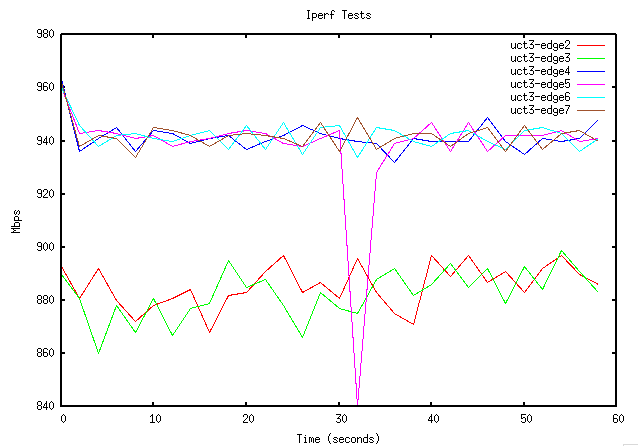
Given data in a file that looks like this (iperf.dat):

0	893	890	963	960	960	962
2	881	881	936	943	946	938
4	892	860	941	944	938	942
6	880	878	945	943	942	941
8	872	868	936	941	943	934
10	878	881	944	942	941	945
12	881	867	943	938	940	944
14	884	877	939	940	942	942
16	868	879	941	941	944	938
18	882	895	942	943	937	942
20	883	885	937	944	946	943
22	891	888	940	943	937	942
24	897	878	942	939	947	941
26	883	866	946	938	935	938
28	887	883	943	941	945	947
30	881	877	941	944	946	936
32	896	875	940	840	934	949
34	883	888	939	928	945	937
36	875	892	932	939	944	941
38	871	882	941	941	940	943
40	897	886	940	947	938	943
42	889	894	940	936	943	938
44	897	885	940	947	944	943
46	887	892	949	936	940	945
48	891	879	940	942	937	936
50	883	893	935	942	944	946
52	892	884	941	942	945	937
54	897	899	940	944	943	943
56	890	891	941	940	936	944
58	886	883	948	941	941	940

Can use gnuplot to make a plot. First make a plot file (iperf.p) with the commands want:

set title "Iperf Tests"
set xlabel "Time (seconds)"
set ylabel "Mbps"
plot \
"iperf.dat" using 1:2 title 'uct3-edge2' with lines, \
"iperf.dat" u 1:3 t 'uct3-edge3' w lines, \
"iperf.dat" u 1:4 t 'uct3-edge4' w lines, \
"iperf.dat" u 1:5 t 'uct3-edge5' w lines, \
"iperf.dat" u 1:6 t 'uct3-edge6' w lines, \
"iperf.dat" u 1:7 t 'uct3-edge7' w lines

Start gnuplot and load the plotfile.

pong:Desktop maryh$ gnuplot

	G N U P L O T
	Version 4.2 patchlevel 2 
	last modified 31 Aug 2007
	System: Darwin 9.1.0

	Copyright (C) 1986 - 1993, 1998, 2004, 2007
	Thomas Williams, Colin Kelley and many others

	Type `help` to access the on-line reference manual.
	The gnuplot FAQ is available from http://www.gnuplot.info/faq/

	Send bug reports and suggestions to 


Terminal type set to 'x11'
gnuplot> load 'iperf.p'

Resulting plot:

sample_plot.png