Use:
tr '\r' '\n' < infile > outfile
Use:
tr '\r' '\n' < infile > outfile
I tried to use logrotate.conf to automatically clear out some big log files, but ended up both losing the space the files were using and not being able to get it back.
First problem is how to see how the disk is being used. There are programs to do this called xdu (which I couldn’t get compiled, though I didn’t try very hard) and xdiskusage, which I ended up using. The output of xdiskusage is this:
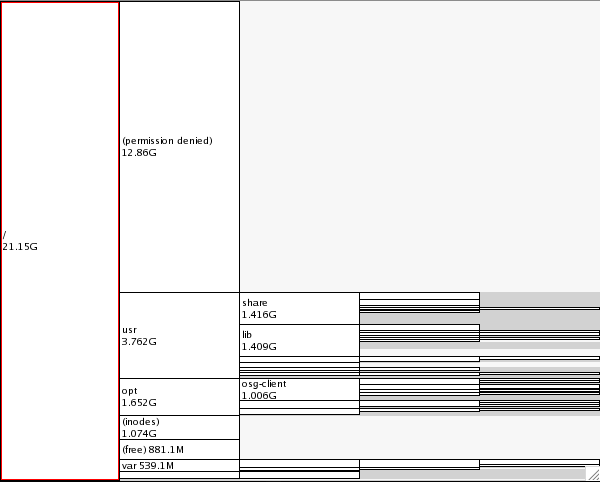
Notice the 12.86GB at permission denied. This is disk space that is being used, but not associated with any filesystem. To find out if this space is due to deleted files, use lsof.
[root@uct3-edge3 maryh]# lsof|grep deleted
sh        15711     root    1w      REG        8,2 8525310901    2541174 /var/log/dCacheDomain.log.2 (deleted)
sh        15711     root    2w      REG        8,2 8525310901    2541174 /var/log/dCacheDomain.log.2 (deleted)
java      15715     root    1w      REG        8,2 8525310901    2541174 /var/log/dCacheDomain.log.2 (deleted)
java      15715     root    2w      REG        8,2 8525310901    2541174 /var/log/dCacheDomain.log.2 (deleted)
sh        15902     root    1w      REG        8,2 5257653371    2541172 /var/log/httpdDomain.log.2 (deleted)
sh        15902     root    2w      REG        8,2 5257653371    2541172 /var/log/httpdDomain.log.2 (deleted)
java      15906     root    1w      REG        8,2 5257653371    2541172 /var/log/httpdDomain.log.2 (deleted)
java      15906     root    2w      REG        8,2 5257653371    2541172 /var/log/httpdDomain.log.2 (deleted)
If I had accidentally deleted these files and wanted to recover them, I could run this command:
$ cp /proc/15906/fd/1 myfile
This command would have to be run for each file. The 15906 is the number from the second column in the lsof command. And the 1 is the number from the fourth column (1w or 2w). Make sure you don’t run cp -a because that won’t work.
I, however, just want to recover the space from the deleted files. I can either reboot or restart the process that was writing to the file.
alias chop="tr -d '\r\n'"
The status of a printer can be checked with:
[computer1 ~]# lpq -P 3rdfl

3rdfl is ready

no entries
If the result comes back with:
3rdfl is not ready
The printer needs to be started. This can be done by opening a web browser on the computer and going to localhost:631. However, it’s easier to just enable it from the command line with:
/usr/bin/enable
Be sure to include the /usr/bin part or it will think it’s a shell built-in command and it won’t work.
/c2/p2 show all

.

.

.
The light on the drive corresponding to this id will flash when this command is run. Helpful for identifying which drive is which. Especially useful, since /cx/px set identifiy doesn’t work on our raid card. (9650SE-8LPML).
First of all, note that scipy requires python >= 2.4. SC4 comes with python version 2.3. So, a newer version of python needs to be installed first. For us, it was installed in /code/hep/bin.
Numpy can be installed for either python 2.3 or 2.5. For 2.3, use yum.
yum install numpy
For the 2.5 version, download the tar file, extract and run:
/code/hep/bin/python setup.py build --fcompiler=gnu
/code/hep/bin/python setup.py install --prefix=/code/hep
This will put the libraries in /code/hep/lib/python2.5.
For scipy, download the file, extract and run:
export PYTHONPATH=/code/hep/lib/python2.5
/code/hep/bin/python setup.py install --prefix=/code/hep
Then, to use the 2.5 version instead of the 2.3 version, put in your .bashrc file:
export PATH=/code/hep/bin:$PATH
export PYTHONPATH=/code/hep/lib/python2.5
On one computer, I was having some problems running yum upgrade. It would complain that a dependency wasn’t installed. However, I could rpm -q that dependency and it showed up fine. To fix this, simply uninstall the package that was the dependency and then run upgrade. That should cause the dependency to be automatically downloaded and installed.
[root@server rhn]# yum upgrade
Loaded plugins: rhnplugin, security
Skipping security plugin, no data
Setting up Upgrade Process
Resolving Dependencies
Skipping security plugin, no data
--> Running transaction check
---> Package dmraid.i386 0:1.0.0.rc13-53.el5 set to be updated
--> Processing Dependency: dmraid-events for package: dmraid
---> Package fetchmail.i386 0:6.3.6-1.1.el5_3.1 set to be updated
---> Package firefox.i386 0:3.0.14-1.el5_4 set to be updated
---> Package net-snmp.i386 1:5.3.2.2-7.el5_4.2 set to be updated
---> Package net-snmp-libs.i386 1:5.3.2.2-7.el5_4.2 set to be updated
---> Package nspr.i386 0:4.7.5-1.el5_4 set to be updated
---> Package xulrunner.i386 0:1.9.0.14-1.el5_4 set to be updated
--> Running transaction check
---> Package dmraid-events.i386 0:1.0.0.rc13-53.el5 set to be updated
--> Processing Dependency: sgpio for package: dmraid-events
--> Finished Dependency Resolution
dmraid-events-1.0.0.rc13-53.el5.i386 from rhel-i386-server-5 has depsolving problems
  --> Missing Dependency: sgpio is needed by package dmraid-events-1.0.0.rc13-53.el5.i386 (rhel-i386-server-5)
Error: Missing Dependency: sgpio is needed by package dmraid-events-1.0.0.rc13-53.el5.i386 (rhel-i386-server-5)
 You could try using --skip-broken to work around the problem
 You could try running: package-cleanup --problems
                        package-cleanup --dupes
                        rpm -Va --nofiles --nodigest
[root@server rhn]# rpm -e sgpio
[root@server rhn]# yum upgrade
Loaded plugins: rhnplugin, security
Skipping security plugin, no data
Setting up Upgrade Process
Resolving Dependencies
Skipping security plugin, no data
--> Running transaction check
---> Package dmraid.i386 0:1.0.0.rc13-53.el5 set to be updated
--> Processing Dependency: dmraid-events for package: dmraid
---> Package fetchmail.i386 0:6.3.6-1.1.el5_3.1 set to be updated
---> Package firefox.i386 0:3.0.14-1.el5_4 set to be updated
---> Package net-snmp.i386 1:5.3.2.2-7.el5_4.2 set to be updated
---> Package net-snmp-libs.i386 1:5.3.2.2-7.el5_4.2 set to be updated
---> Package nspr.i386 0:4.7.5-1.el5_4 set to be updated
---> Package xulrunner.i386 0:1.9.0.14-1.el5_4 set to be updated
--> Running transaction check
---> Package dmraid-events.i386 0:1.0.0.rc13-53.el5 set to be updated
--> Processing Dependency: sgpio for package: dmraid-events
--> Running transaction check
---> Package sgpio.i386 0:1.2.0_10-2.el5 set to be updated
--> Finished Dependency Resolution

Dependencies Resolved

==============================================================================================================
 Package                  Arch            Version                         Repository                     Size
==============================================================================================================
Updating:
 dmraid                   i386            1.0.0.rc13-53.el5               rhel-i386-server-5            718 k
 fetchmail                i386            6.3.6-1.1.el5_3.1               rhel-i386-server-5            527 k
 firefox                  i386            3.0.14-1.el5_4                  rhel-i386-server-5             12 M
 net-snmp                 i386            1:5.3.2.2-7.el5_4.2             rhel-i386-server-5            696 k
 net-snmp-libs            i386            1:5.3.2.2-7.el5_4.2             rhel-i386-server-5            1.3 M
 nspr                     i386            4.7.5-1.el5_4                   rhel-i386-server-5            119 k
 xulrunner                i386            1.9.0.14-1.el5_4                rhel-i386-server-5             10 M
Installing for dependencies:
 dmraid-events            i386            1.0.0.rc13-53.el5               rhel-i386-server-5             22 k
 sgpio                    i386            1.2.0_10-2.el5                  rhel-i386-server-5             11 k

Transaction Summary
==============================================================================================================
Install      2 Package(s)
Update       7 Package(s)
Remove       0 Package(s)

Total size: 25 M
Total download size: 25 M
Is this ok [y/N]: y
Downloading Packages:
(1/6): nspr-4.7.5-1.el5_4.i386.rpm                                                     | 119 kB     00:00
(2/6): fetchmail-6.3.6-1.1.el5_3.1.i386.rpm                                            | 527 kB     00:00
(3/6): net-snmp-5.3.2.2-7.el5_4.2.i386.rpm                                             | 696 kB     00:00
(4/6): net-snmp-libs-5.3.2.2-7.el5_4.2.i386.rpm                                        | 1.3 MB     00:00
(5/6): xulrunner-1.9.0.14-1.el5_4.i386.rpm                                             |  10 MB     00:01
(6/6): firefox-3.0.14-1.el5_4.i386.rpm                                                 |  12 MB     00:01
--------------------------------------------------------------------------------------------------------------
Total                                                                         5.3 MB/s |  25 MB     00:04
Running rpm_check_debug
Running Transaction Test
Finished Transaction Test
Transaction Test Succeeded
Running Transaction
  Updating       : nspr                                                                                  1/16
  Updating       : xulrunner                                                                             2/16
  Updating       : net-snmp-libs                                                                         3/16
  Installing     : sgpio                                                                                 4/16
  Updating       : net-snmp                                                                              5/16
  Updating       : fetchmail                                                                             6/16
  Updating       : firefox                                                                               7/16
  Updating       : dmraid                                                                                8/16
  Installing     : dmraid-events                                                                         9/16
  Cleanup        : nspr                                                                                 10/16
  Cleanup        : net-snmp-libs                                                                        11/16
  Cleanup        : firefox                                                                              12/16
  Cleanup        : net-snmp                                                                             13/16
  Cleanup        : xulrunner                                                                            14/16
  Cleanup        : fetchmail                                                                            15/16
  Cleanup        : dmraid                                                                               16/16

Dependency Installed:
  dmraid-events.i386 0:1.0.0.rc13-53.el5                      sgpio.i386 0:1.2.0_10-2.el5

Updated:
  dmraid.i386 0:1.0.0.rc13-53.el5     fetchmail.i386 0:6.3.6-1.1.el5_3.1       firefox.i386 0:3.0.14-1.el5_4
  net-snmp.i386 1:5.3.2.2-7.el5_4.2   net-snmp-libs.i386 1:5.3.2.2-7.el5_4.2   nspr.i386 0:4.7.5-1.el5_4
  xulrunner.i386 0:1.9.0.14-1.el5_4

Complete!
[root@server rhn]#
Got this error after a new RHEL5 install. To fix, run the following as root:
gtk-update-icon-cache -f /usr/share/icons/hicolor/
Found a new program, called lshw. It just gives a list of the hardware in the computer, much like /etc/sysconfig/hwconf. But, the part I like is that it also gives you the model of the motherboard. So, it saves me a trip of walking to other buildings to see what’s inside a computer.
Example showing motherboard (output is long):
*-core
       description: Motherboard
       product: P4S800
       vendor: ASUSTeK Computer INC.
       physical id: 0
       version: REV 1.xx
       serial: xxxxxxxxxxx
     *-firmware
          description: BIOS
          vendor: Award Software, Inc.
          physical id: 0
          version: ASUS P4S800 ACPI BIOS Revision 1009 (06/08/2004)
          size: 64KiB
          capacity: 192KiB
          capabilities: pci pnp apm upgrade shadowing escd cdboot bootselect socketedrom edd int13floppy360 int13floppy1200 int13floppy720 int13floppy2880 int5printscreen int9keyboard int14serial int17printer int10video acpi usb agp
Had a problem where one user would have hundreds of procmail processes running. Would look something like this:
root     19395     1  0 Nov10 ?        00:00:00 sendmail: ./mAA8qmVx019388 from queue
user1   19396 19395  0 Nov10 ?        00:00:00 procmail -f vcejixtxapby@borg.wyle.ingr.com -t -Y -a  -d user1
root     19428     1  0 Nov08 ?        00:00:00 sendmail: ./mA91ThBb019426 from queue
user1   19429 19428  0 Nov08 ?        00:00:00 procmail -f Kabj@lumenetwerk.nl -t -Y -a  -d user1
In the users mail folder, there was a directory Junk which is where all this junk mail was supposed to go, but it wasn’t getting written there. However, there was a file called Junk.lock there. The problem was that procmail seemed to be creating the lock, which was then getting stuck. The solution was to edit the user’s .procmailrc file.
This is how it looked:
:0:
* ^Subject:.*HEP_SPAM
Junk
I changed it to:
:0
* ^Subject:.*HEP_SPAM
Junk
Losing the : after the 0 tells it to not use locking. This solved the problem.